Logo
Submit a request
Sign in

Editing Inline Image

  1. Mailbird
  2. Knowledge Base
  3. Composing Emails
Avatar
Oliver Jackson
  • September 15, 2023 09:04
  • Updated

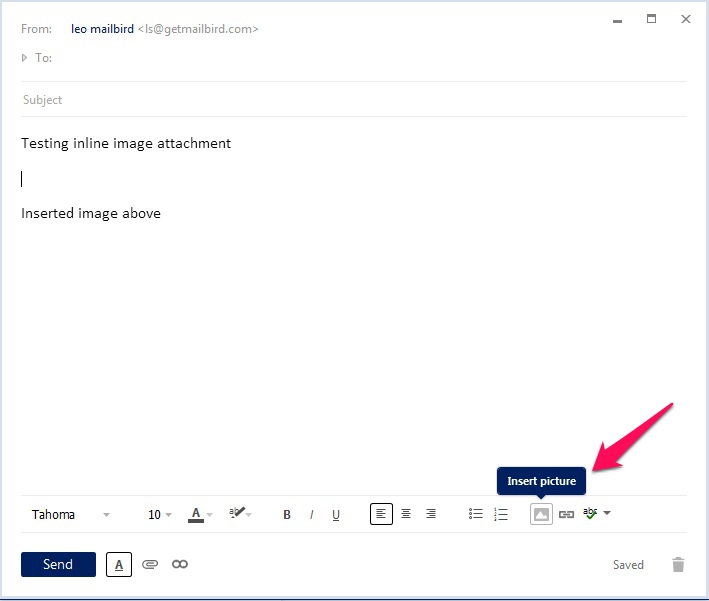
In Mailbird it's possible to include an image within the body of an email, rather than simply as an attachment - since we realise that many people require this option in order to enrich the appearance of their emails, our process to add such images makes it quick and easy.

To begin with, click on the Image icon (as shown below) in order to start the process:
1.jpg

You will then be given the option to select the size of your image, as well providing the source of the image (i.e. from your device or from a specific URL).


If the inserted inline image is too big or too small after you have added it to the email, you can adjust its size directly from Mailbird - all you need to do is click on the image until you see a border appear, and then click on the corners of its border to manually resize it to the most suitable dimensions.


2.JPG

Hopefully you have found this article useful, but if you still require assistance, please do not hesitate to contact our Customer Happiness Team by clicking here.

  • Facebook
  • Twitter
  • LinkedIn
Have more questions? Submit a request
Return to top

Related articles

  • How to Attach a File
  • .eml and .msg attachments are not visible in Mailbird
  • Emoji / emoticons in Mailbird
  • Mailbird for Mobile (Android, iOS)
  • Transitioning From Quick Reply to Normal Reply

Articles in this section

  • Transitioning From Quick Reply to Normal Reply
  • Quick Compose Shortcut
  • Collapse quoted message by default when replying
  • How to Attach a File
  • How to insert table in the Compose window
  • Is there a limit for the number of recipients in Mailbird?
  • Editing Inline Image
  • Emoji / emoticons in Mailbird
Email just the way you like it
facebook twitter instagram linkedin youtube
LEARN MORE
  • Email Features
  • Pricing
  • Blog
COMPANY
  • About
  • We’re Hiring!
  • Press
  • For Business
  • Mailbird for Mac
  • Testimonials
SUPPORT
  • Help Center
  • License Key Retrieval
  • Become an Alpha tester
  • Unsubscribe from Newsletter
SETUP
  • All IMAP and SMTP settings
  • Gmail.com IMAP SMTP
  • Outlook.com IMAP SMTP
  • Office365 IMAP SMTP
  • Yahoo.com IMAP SMTP
  • Godaddy email IMAP
BEST ALTERNATIVES
  • Best Gmail App
  • Best Alternative to Outlook
  • Best Alternative to Thunderbird
  • Best Alternative to Windows Mail
mailbird logo
© Copyright 2012-2023 Mailbird™ All Rights Reserved.
Terms of ServicePrivacy PolicySitemap
Made with

Mailbird for Mac is coming

Sign up to get early access!

Thank you! we will notify you with updates about Mailbird for Mac

close